


We're glad you want to use our endereco Shopify app for address validation!.
With our address validation app, combined with up-to-date address data that supports routing codes, you have the perfect tool for automatically checking and correcting shipping addresses.
Our app for online retailers is designed to take a lot of the work off your hands and drastically reduce the time spent on manual address correction. To do this, we help your customers with automatic address correction or provide correction suggestions that they can select with a single click. This way, they can confirm their address or adjust it themselves before the merchandise is shipped to the wrong address!
We obtain address data directly from national postal services. They know exactly which addresses in their country are deliverable and what the correct spelling and formatting are.
Here is an overview of the most important functions and features:
(As of Release 1.4.1, October 7, 2026) #
- Address validation and automated correction—or correction suggestions—directly at checkout for Shopify Plus customers in over 200 countries
- Address verification and automated correction or correction suggestions on the thank-you page—immediately after placing an order—for over 200 countries (e.g., after making a purchase with PayPal Express, Apple Pay, or Google Pay)
- Verification of addresses from the address book of registered customers when they are selected as a shipping address
- Automatic correction of ZIP code, city, and street if they are unique
- Automatically set the correct state
- Identifying and verifying package drop-off stations, post offices, and their corresponding postal codes
- Block the checkout process if customers enter an incorrect address—without correcting or confirming it
- Customers can override the suggested addresses at any time and confirm their address if endereco does not yet have it on file.
- Orders with undeliverable addresses can be automatically placed on hold upon request to pause delivery.
- Each time an address is verified, tags are added to the received order that describe the status of a verified shipping address
- Billing is based on the number of completed and verified orders. If the customer does not complete the order, no charge will be incurred!
- Real-time statistics within the app on operating costs and tests performed
- Billing directly via Shopify
Easy setup—ready to use in your Shopify checkout in just a few minutes!- Flexible Rates – Book and Adjust Directly in the App
- 30 days free—no catch—no exceptions—try out our service to your heart's content!
The key difference:
Postal addresses that are valid for sorting codes and up-to-date, based on the databases of the national postal services in each country—such as DHL, Swiss Post, Austrian Post, etc.—ensure an optimal delivery rate! In addition, we make corrections according to country-specific rules and take into account the unique characteristics of each country!
An overview of our country coverage
We have 10 years of experience in address validation, which is used every month by millions of users in online stores and ERP systems!
What features are available to me? #
For all Shopify customers Available:
Address Validation and Correction Suggestions on the „Thank You“ Page
- Corrects small address errors fully automatically
- Generates address suggestions for the online store customer to choose from
- Detects missing or incorrect house numbers
- Recognizes Packstations and post offices in Germany
- Recognizes missing or invalid DHL post numbers
Order Processing in OrderView in the Backend of Your Shopify Store
- Puts orders with incorrect addresses on „Hold“ – and back to „unfulfilled“ once corrected
- Sets tags to document an address verification, the verification status, and the customer's action
- Address changes are documented in the order history
- For Shopify Plus customers In addition:
- Address Validation During the Checkout Process When Entering an Address
- Address Validation During Checkout When Selecting an Address from the Address Book
- Address autocomplete in your input forms—directly from endereco, not from Google. This means addresses with routing codes directly from the national postal services.
- Blocking the checkout process if the address is unconfirmed or incorrect
- Auto-correction of obvious errors
- Address suggestions, reports of address errors, and correction suggestions
SETUP in just 10 minutes #
Let's get started with the installation
1. Install the endereco app in your Shopify store – Click here to find the app in the Shopify App Store
2. Confirm access permissions—so the app can verify customer addresses. We need access to the following data:
- View customers—for billing based on incoming orders for which your customers can use endereco services, as well as for address corrections during checkout and on the thank-you page
- Store owner data - to create your account at endereco, an approval process by our team in the background and support options if required
View and Edit Store Data – for Promotions in the Order Summary

Go through the installation wizard
We have created a setup wizard for you to go through everything you need in just a few simple steps.
Step 1: Registration #
The first step is to connect your webshop to endereco and provide us with the master data for customer creation.
We have the possibility to access your store master data and pre-fill the form. Please check and correct the data if necessary.
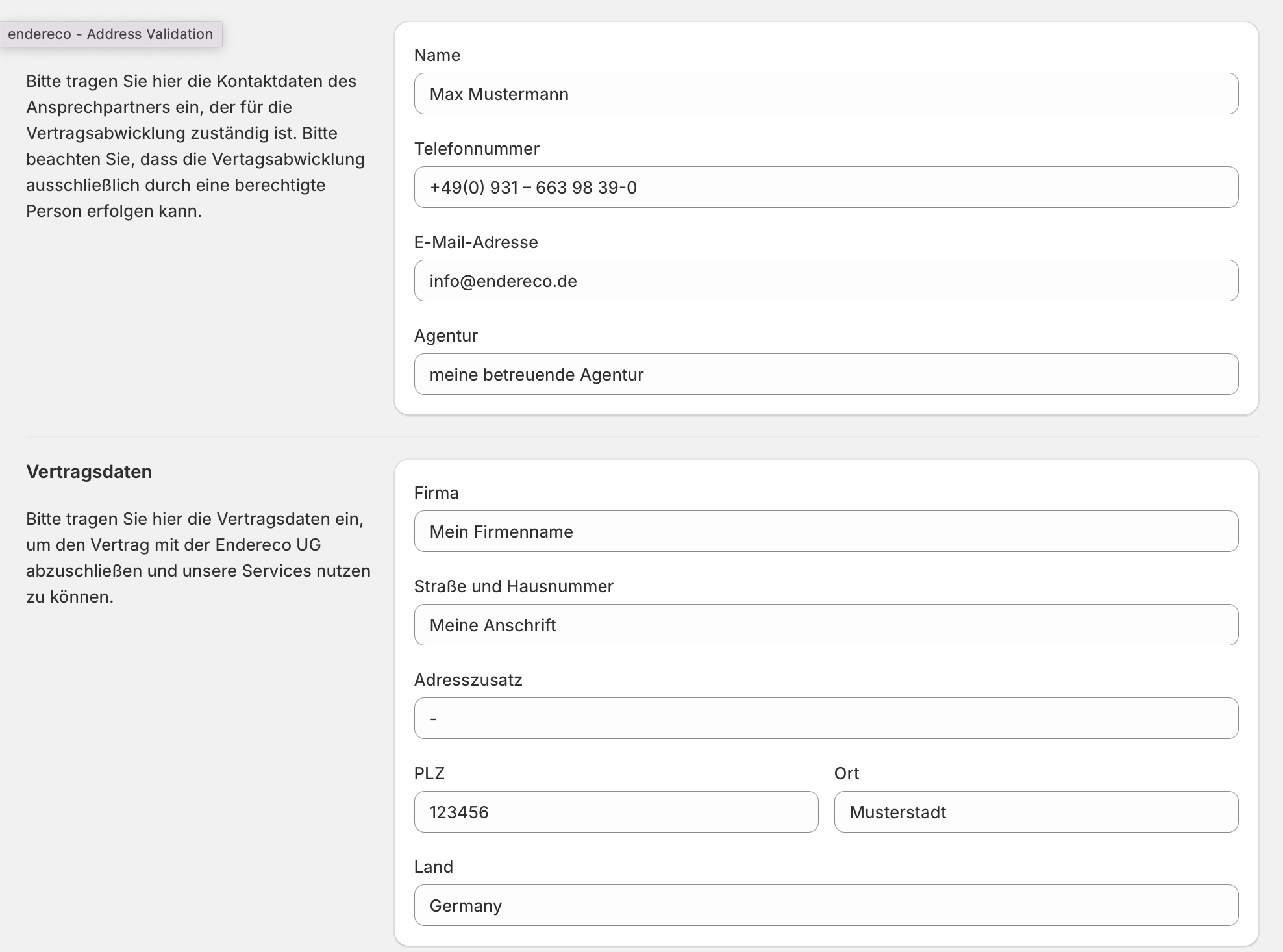
You must also agree to our terms and conditions (GTC + data protection provisions).
As we process your customers' personal data, you should enter into an agreement with us. Agreement on commissioned data processing conclude the agreement. You can conveniently sign the agreement digitally online. As soon as both parties have signed it, a signed copy will be sent by email to both parties for documentation purposes.
Step 2: Select tariff #
All endereco customers receive a one-time, 30-day free trial from us. This allows you to try out the app easily, with no risk and no contract commitment. However, you can cancel your subscription at any time within the 30-day period. There are no additional costs. After that, you’ll need to select a plan to continue using the app.

Order-Based Billing
Shopify will bill you in euros based on the actual use of our services per order.
In other words, if a service is used during the checkout process and the order is completed, we charge a usage fee for the address verification on the „Thank You“ page, or, if applicable, for the endereco address entry wizard and address checks during checkout (Shopify Plus customers).
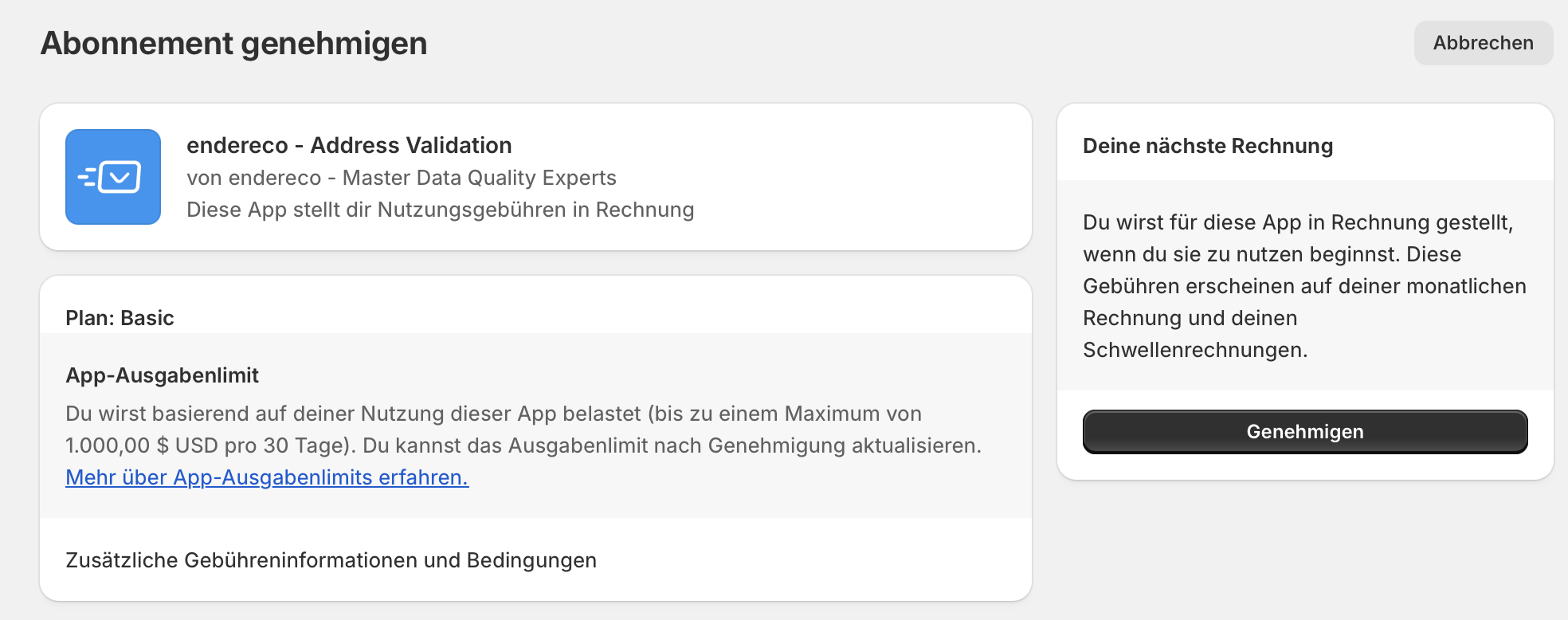
Confirm spending limit
You can set a maximum spending limit in your Shopify account so that you can keep an eye on your costs at all times. Simply confirm this limit to successfully book the plan.
Step 3: Enable Features #
Now it's time to configure the individual functions.

Shopify Plus Features #
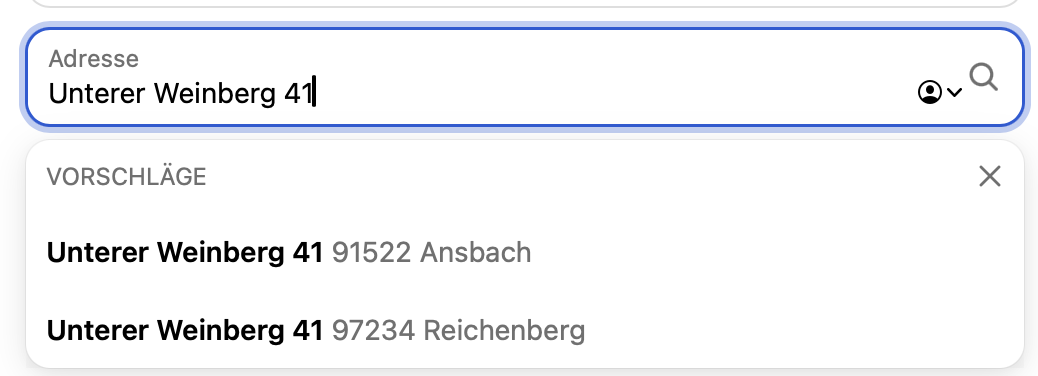
1. Address Entry Wizard
When entering addresses, the autocomplete suggestions are provided by endereco, not by Google (Shopify's default). This means your customers receive address suggestions based on national postal services. As a result, these suggestions are also based on the same data source as the address validation!
2. Feature: Address Validation at Checkout
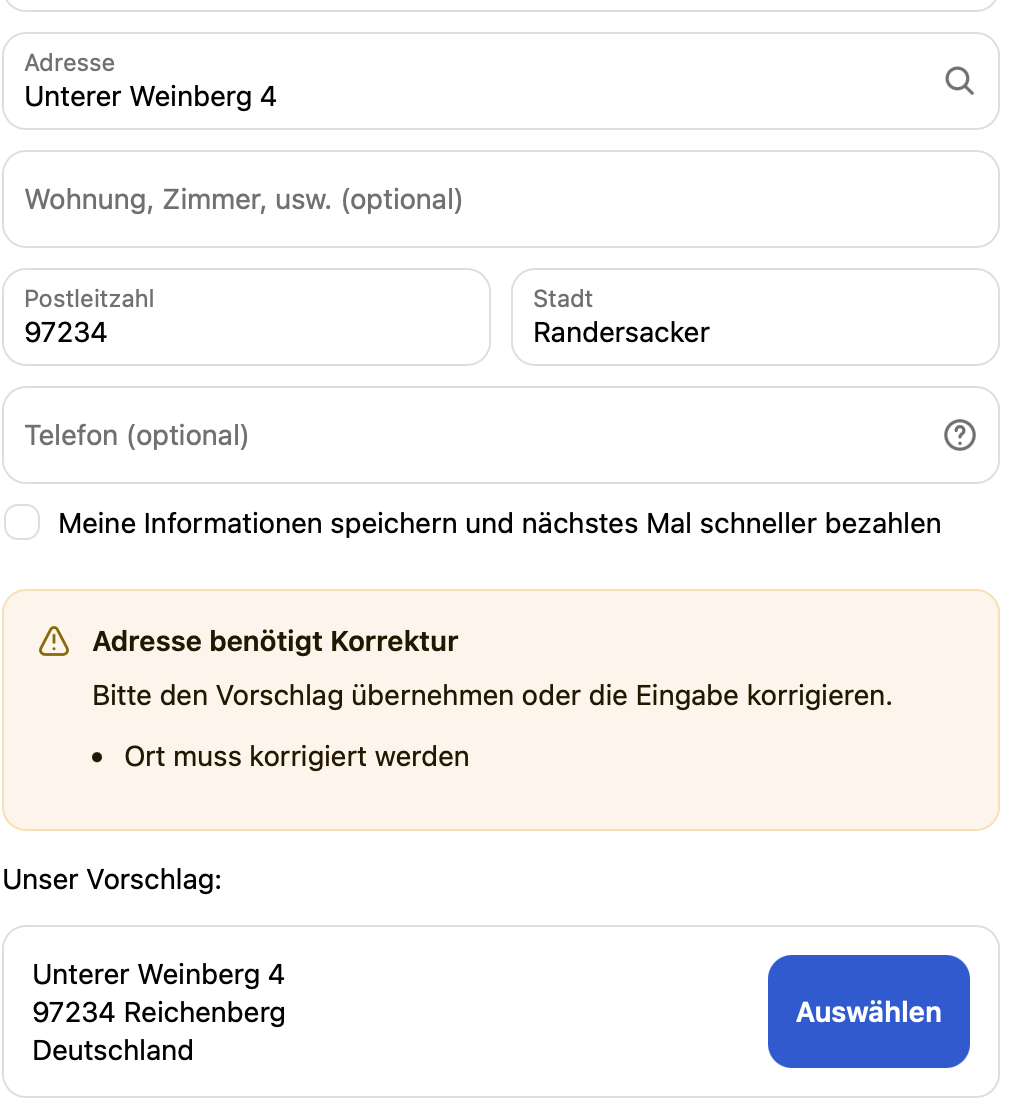
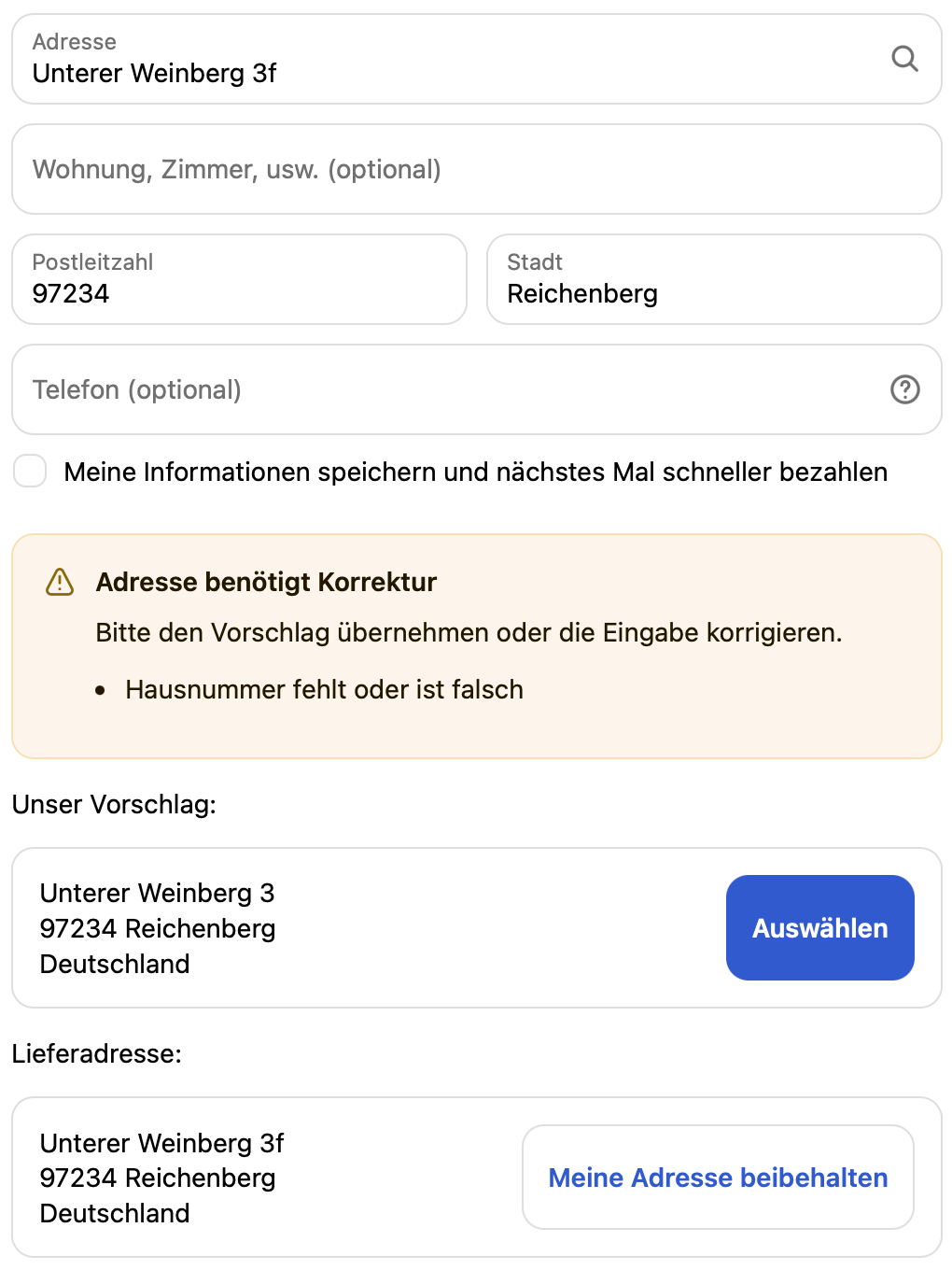
After entering an address at checkout or selecting an address from the address book, an address validation is performed immediately. Customers receive immediate feedback and can respond to the address validation right then and there.
Here are a few examples of feedback




3. Feature: Block checkout for invalid addresses
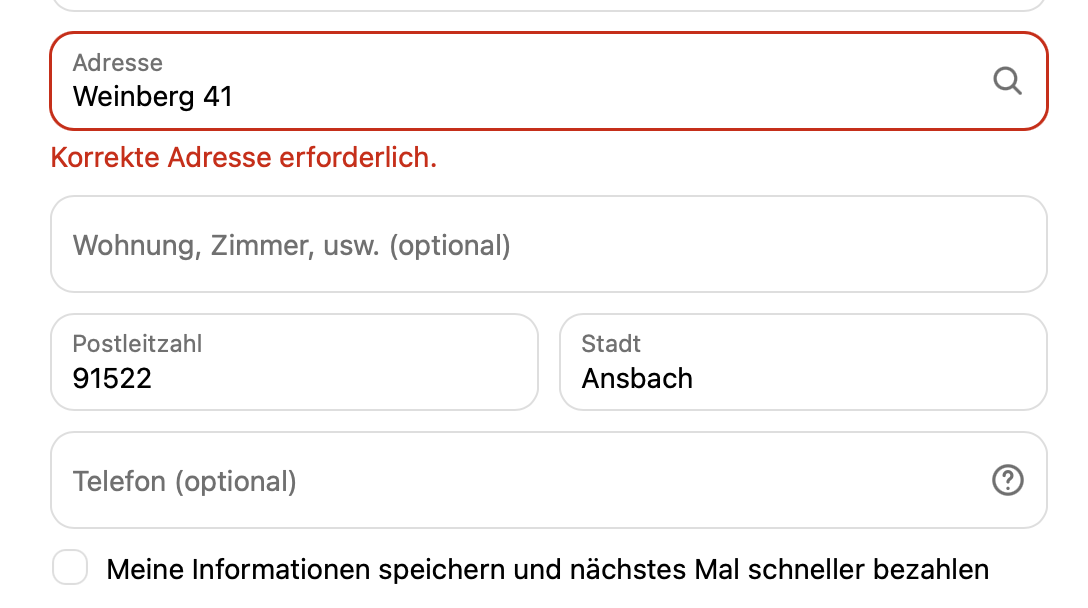
When attempting to proceed through checkout, the user is redirected back to the address page until they have corrected their address or confirmed that it is correct. This ensures that orders with incorrect addresses are consistently prevented.
Features for All Shopify Customers #
4. Feature: Perform an address validation on the thank-you page
The address validation process checks all shipping addresses on the thank-you page, immediately after the order is completed, to ensure they are valid for delivery.
This includes global address data, package pickup stations, and post offices in Germany. The data is sourced from the national postal services of the respective countries.
- If the address is correct, the verified address will be confirmed
- If there are minor errors, the address will be corrected automatically upon request (Feature Toggle 5)
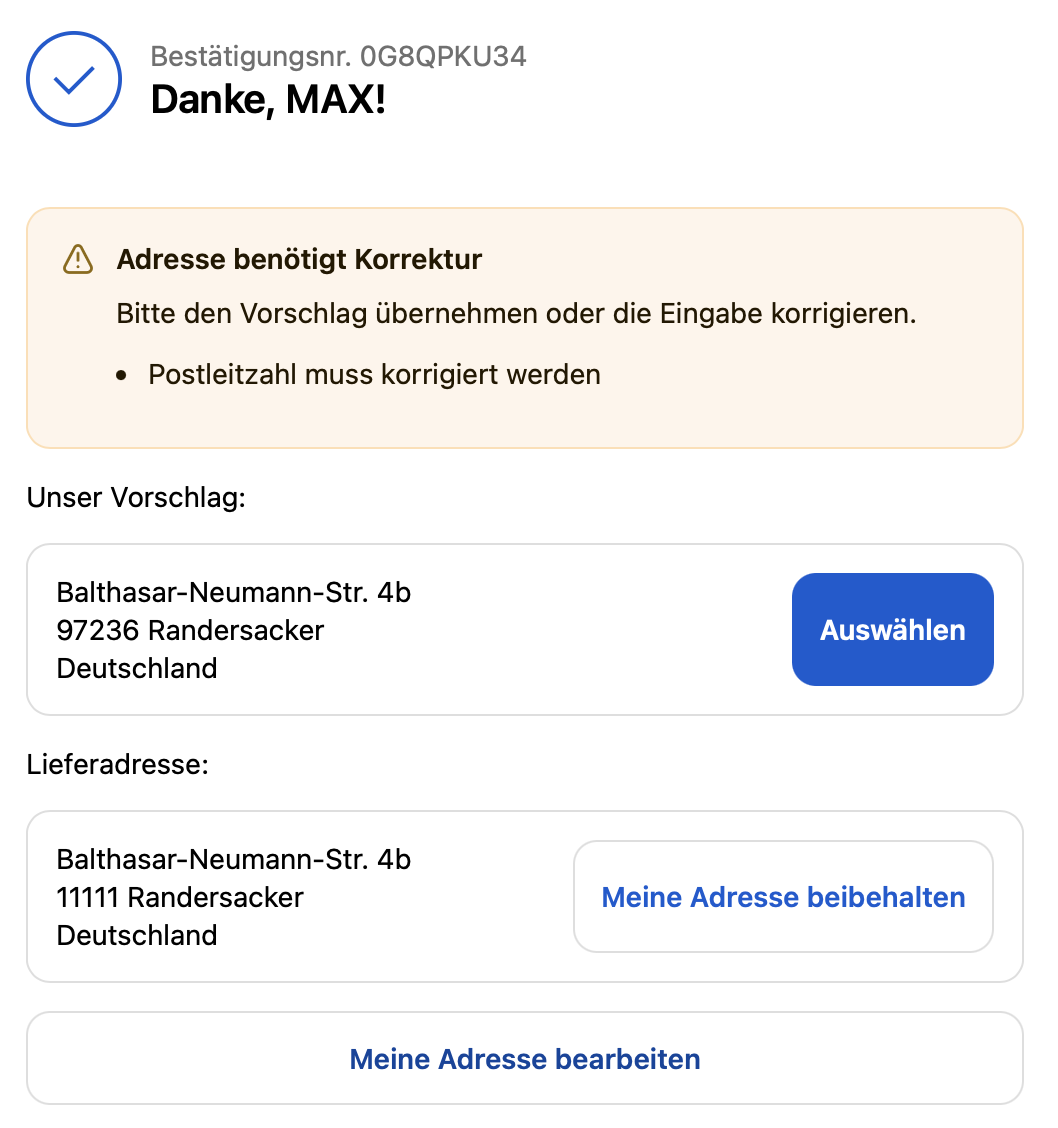
- If there are major errors, the customer will be provided with a suggested address
- If the address cannot be found, the customer receives a message asking them to correct it
- If the house number cannot be found, the customer will also receive a message asking them to check it.
The customer can accept any suggestion, edit the address, or confirm that their entry is correct.

5. Feature: Set order status to "HOLD" or "Unfulfilled"
If a customer completes an order by ignoring the suggested addresses, the order is automatically placed on hold. This happens on the Thank You page when the order is transferred to the online store. If the customer or online retailer corrects the address, it is checked again. If the recheck is successful, the status is changed to “Unfulfilled.”.
Example: Order with an uncorrected suggested address
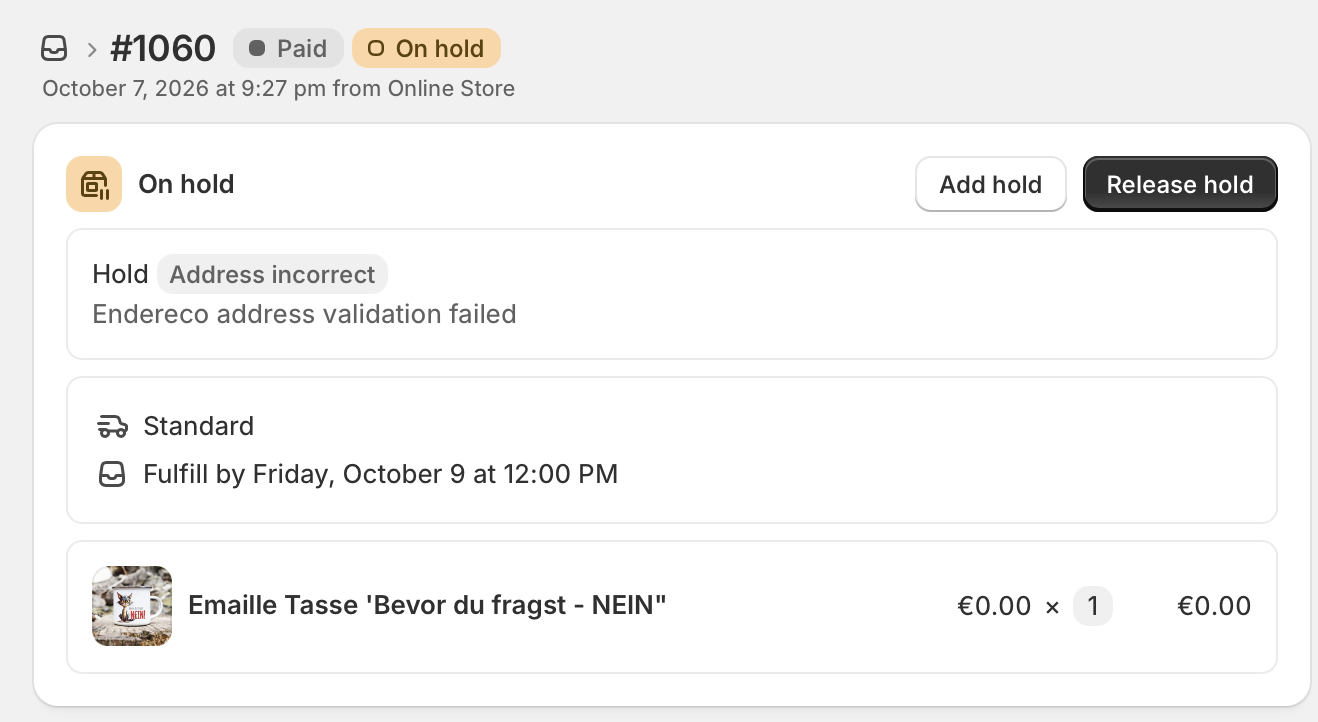
Backend display: Order is set to "On Hold" if it was previously marked as "Unfulfilled"
Pausing orders only works if „Automatic Fulfillment" has been set to "Inactive" in the store.
The status of the address is described using tags—in this example, an extreme case

6. Feature: Set the order status to "Unfulfilled" when a customer confirms their address
An extension of Feature 5 is the automatic release of orders in cases where a customer marks an order as correct—even though endereco did not classify it as such during the review—and thereby confirms it. If the customer does so, the order is released again and proceeds through the regular process.

7. Feature: Automatically correct minor address errors
If an address can be corrected unambiguously, the address can be corrected directly and fully automatically, rather than displaying a suggested correction to the customer. The customer then sees only a notification that the address has been corrected, along with details of exactly what was changed.
This feature affects both the thank-you page and the checkout process!

Step 4: Customize checkout process templates #
Now all you need to do is integrate the endereco functions into your checkout process.
To do this, you'll need to use the endereco blocks in your theme so that the individual features can be integrated into your checkout process. Here are the step-by-step instructions for each feature:
Feature 1: Integration of address validation on the thank-you page (for all Shopify customers)
Simply follow the steps below:

1. click on „Set up address verification“.
2. you should now land on the settings page with the option „Checkout“ - select the item „Customize“ there.
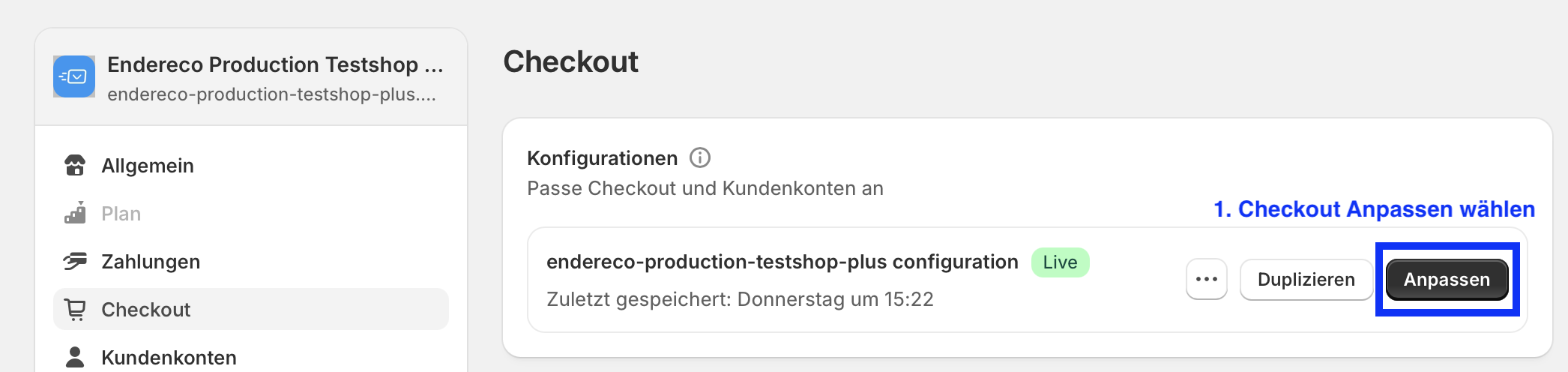
This will take you to the Shopify template editor.
3. Select the „Thank You“ page at the top of the checkout template.
4. In the left-hand side menu, in the Main section, click „Blocks“ to select „endereco-thankyou-addresscheck.“.
5. Check the positioning—it should be placed in the area below „Confirmation,“ in the block on the
6. save your setting.
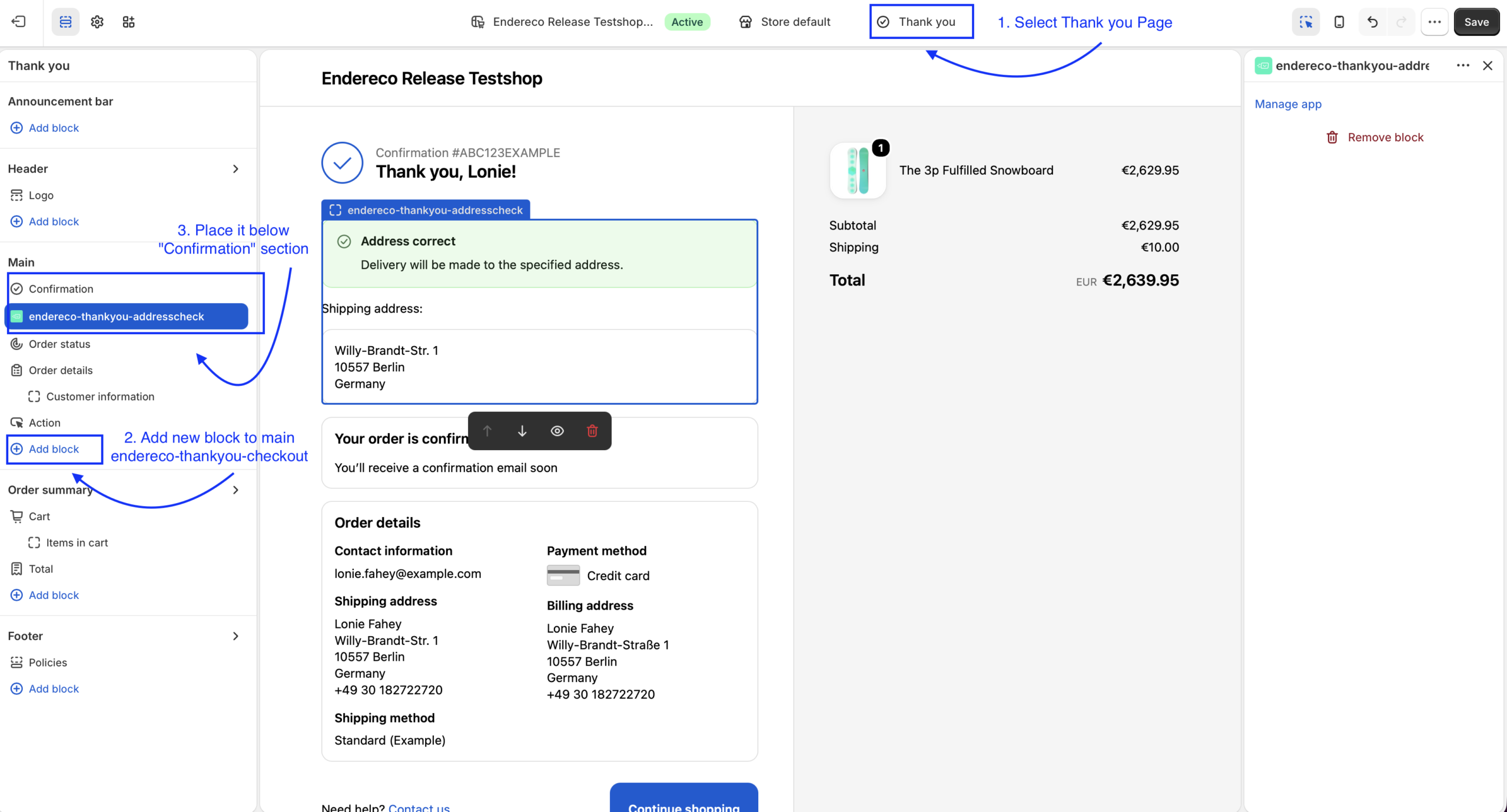
That completes the setup of this feature!
Function 2: Integration of address auto-completion On the checkout page (Shopify Plus only)
Simply follow the steps below:

1. click on „Set up address autocomplete“.
2. you should now land on the settings page with the option „Checkout“ - select the item „Customize“ there.
1. Check to see if you're on the Checkout page (top right)
2. Now select the gear icon in the left-hand menu
3. Scroll all the way to the bottom of the section to the right of it.
4. Now you can enable endereco as the data provider for autocomplete
5. Save the settings. .
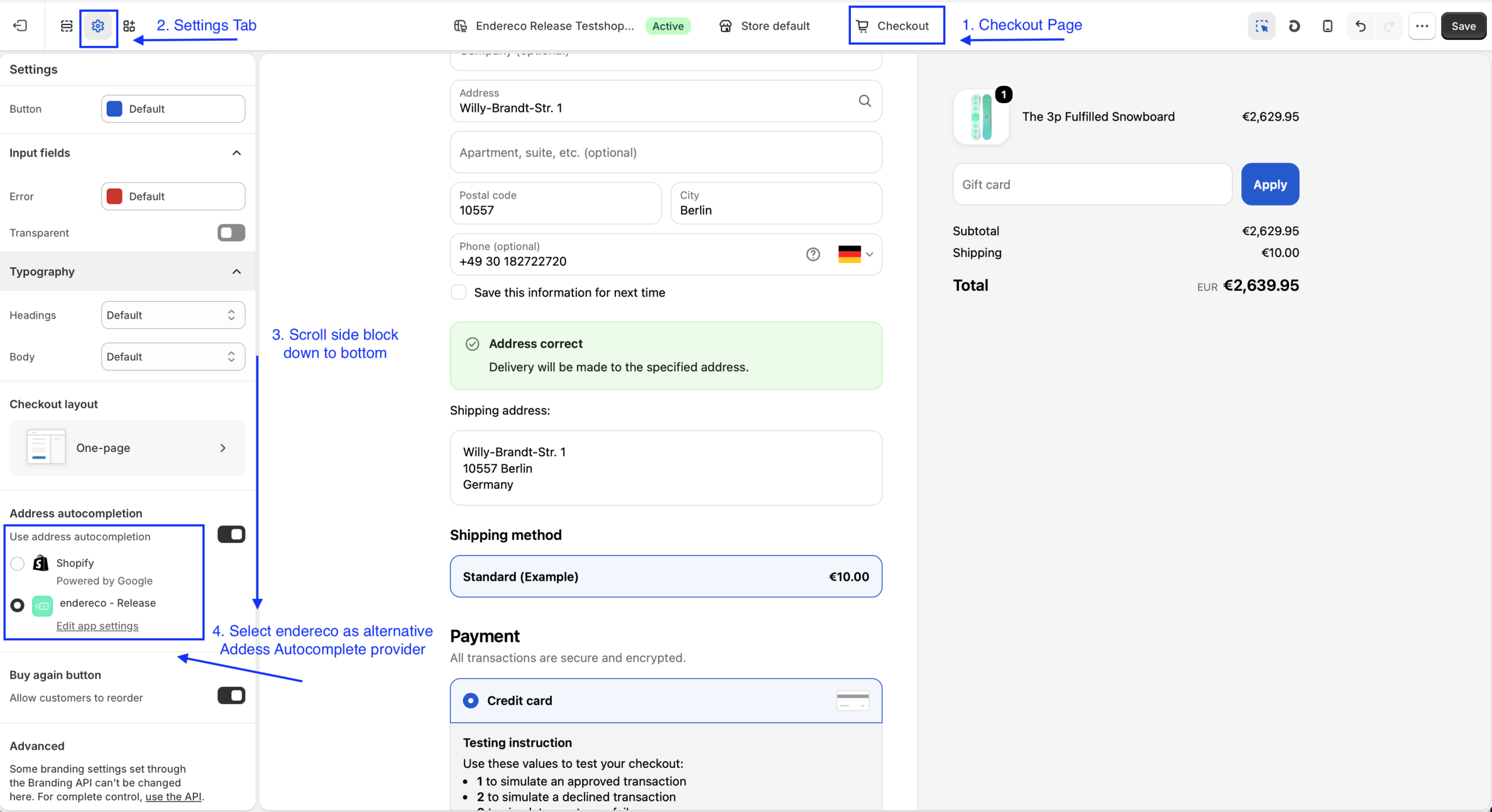
NoteIf you do not use a Plus Shop, you can only activate or deactivate Google Autocomplete. The address check will then also correct any addresses suggested by Google to correct postal addresses.
This completes the setup of this feature.
Function 3: Address check On the checkout page (Shopify Plus only)
The address validation on the Shopify checkout page requires a template block, which can be easily added using the Template Editor.

To do this, go to the Theme Editor.
- Go to the Checkout page
- Add a block in Main and select endereco-checkout-addressvalidation
- Check whether the block has been added under „Delivery Address“
- Check all the checkboxes on the right in the „Manage App“ section
- Save Settings
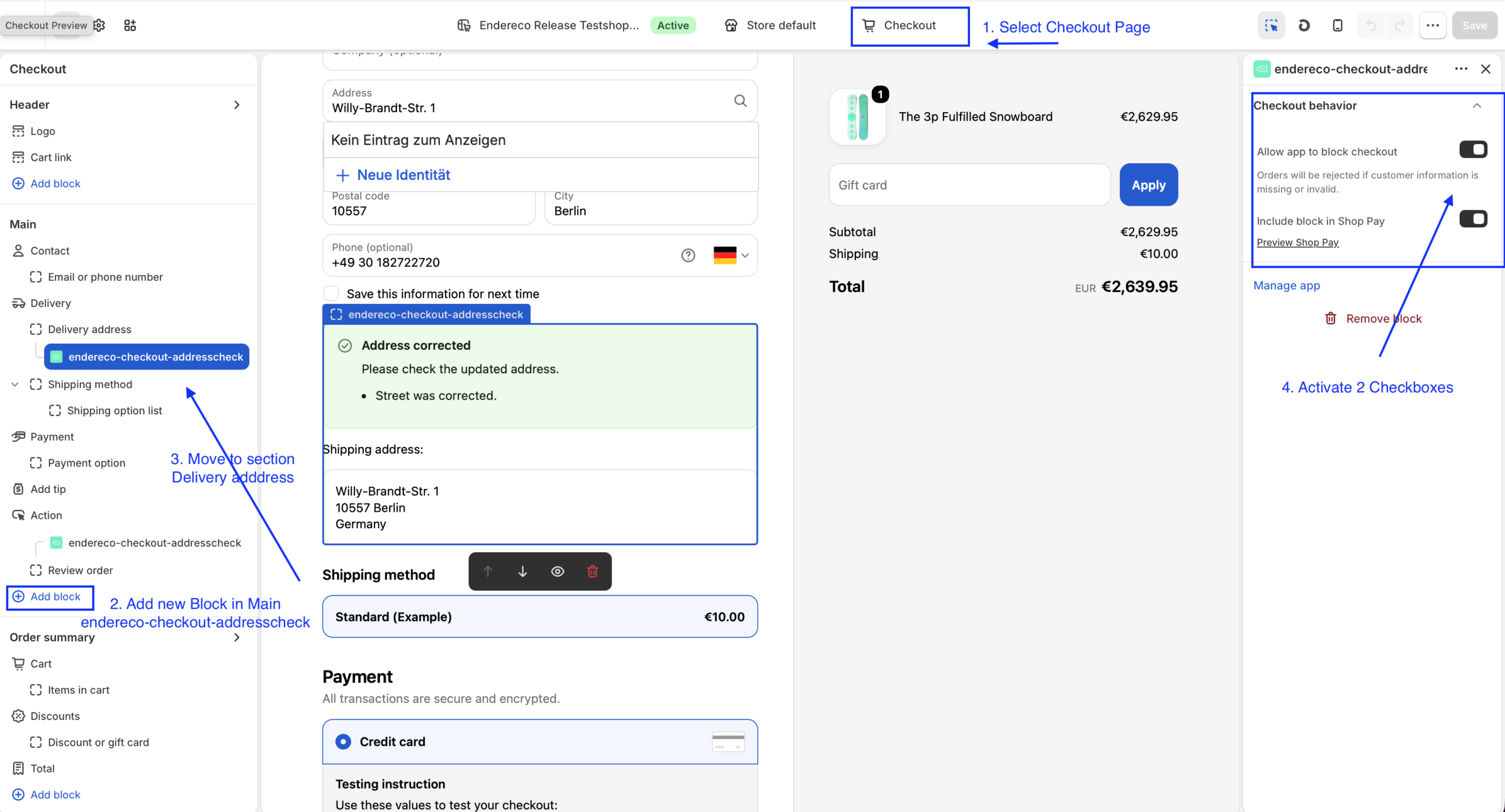
This completes the setup of this feature.
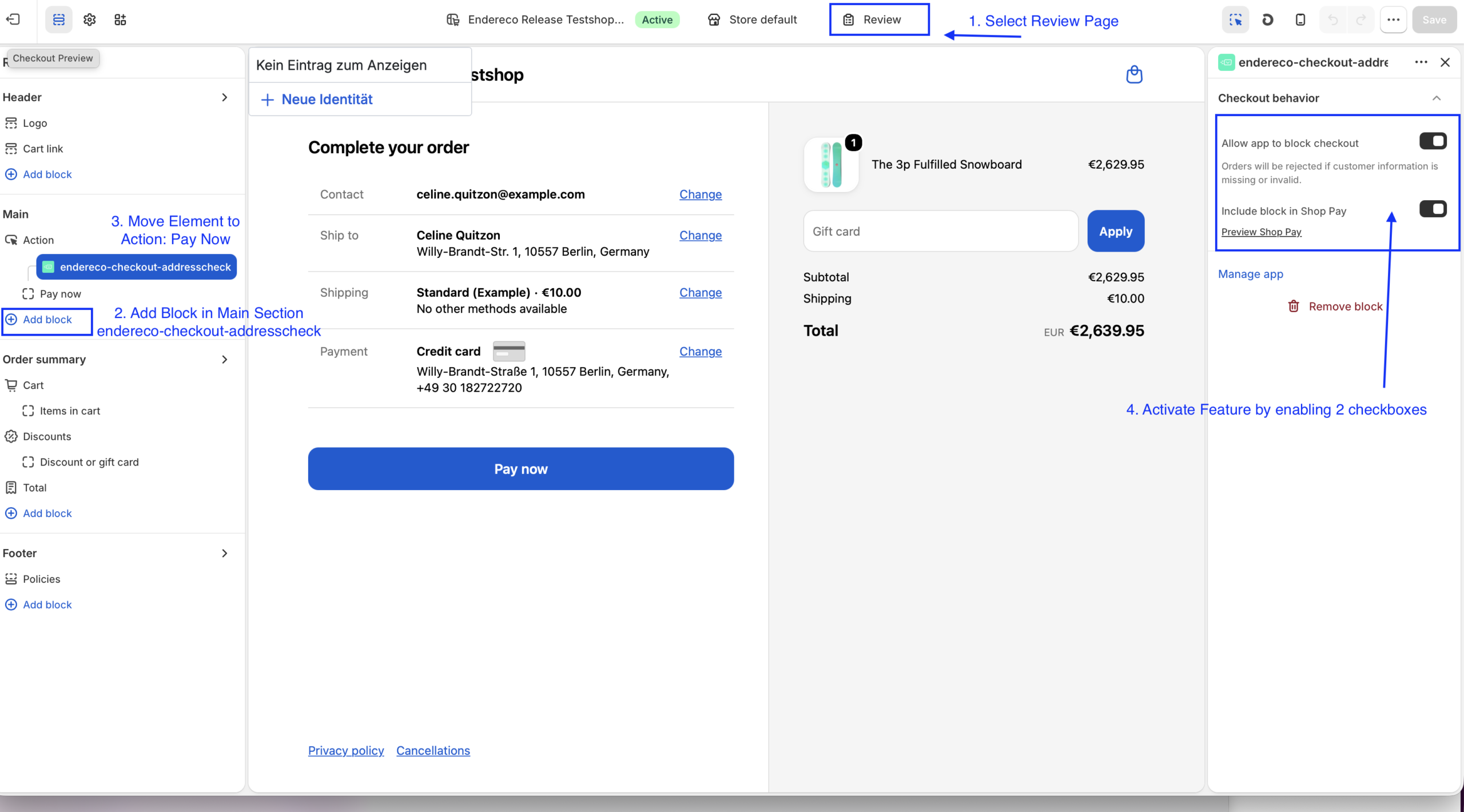
Function 4: Block checkout with an invalid address (Shopify Plus Only)
To block the checkout process, an action must be added to "Review Order" that prevents the order review until the address has been confirmed or corrected.

To do this, return to the Template Editor
- Select the "Review" page or action in the upper-right corner
- Add a block to the „Main“ section
- Check whether the „PayNow“ action or the "Review Order" button has been assigned to the block
- On the right, in the „Manage App“ section, check all the boxes
- Save Settings
This completes the setup of this feature.
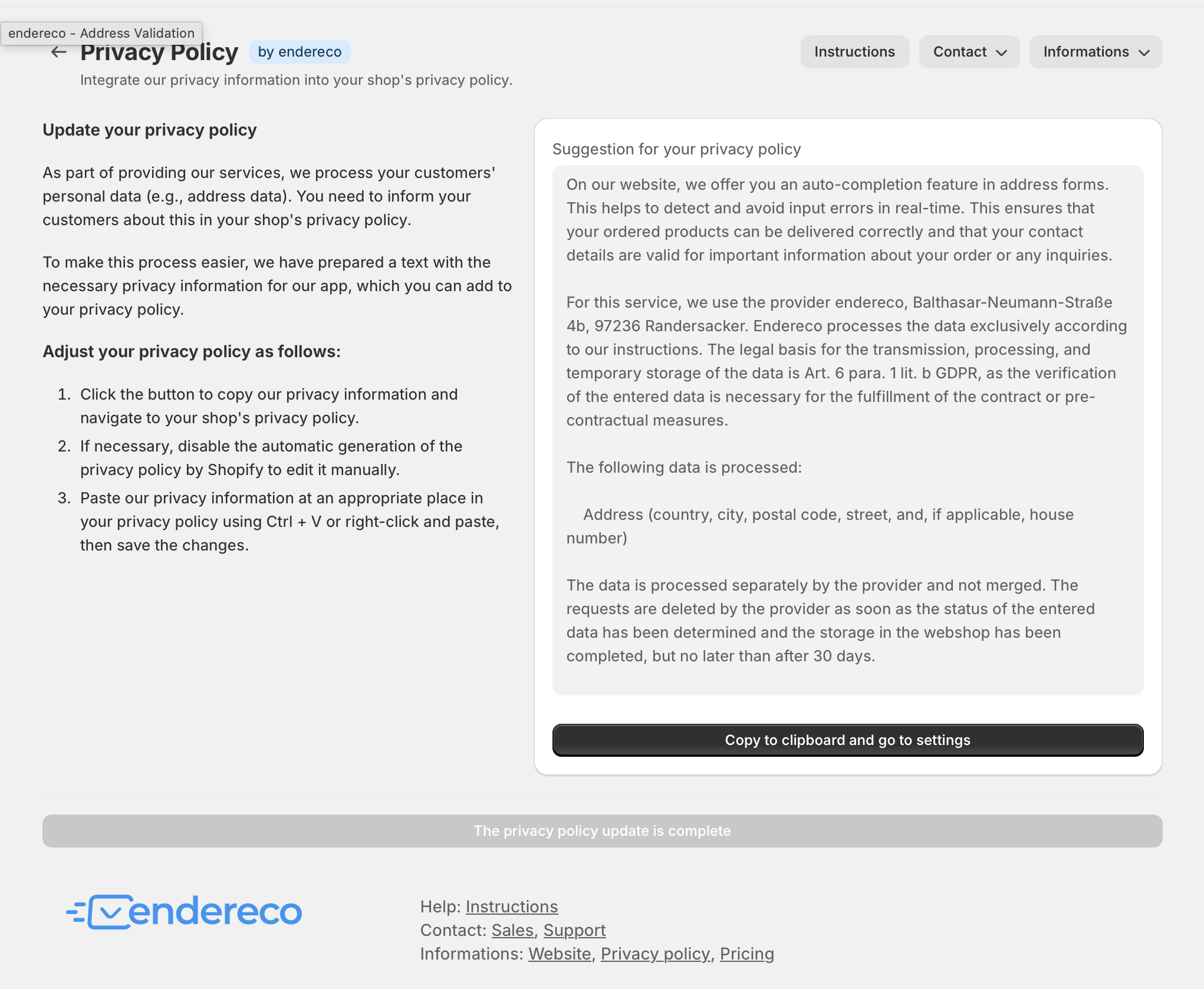
Step 5: Updating Your Privacy Policy #
For the legally compliant operation of your online store, your customers must be able to find out about the sub-processors used to process personal data.
We have provided you with a suggested text that you can insert into your webshop's privacy policy. Please note that this may need to be adapted depending on the configured service or checked by your legal contact.
Your setup is now complete!
Step 6. Functional test! #
Now open your webshop, add a product to the shopping cart and go to the address entry page.
Shopify Plus customers:
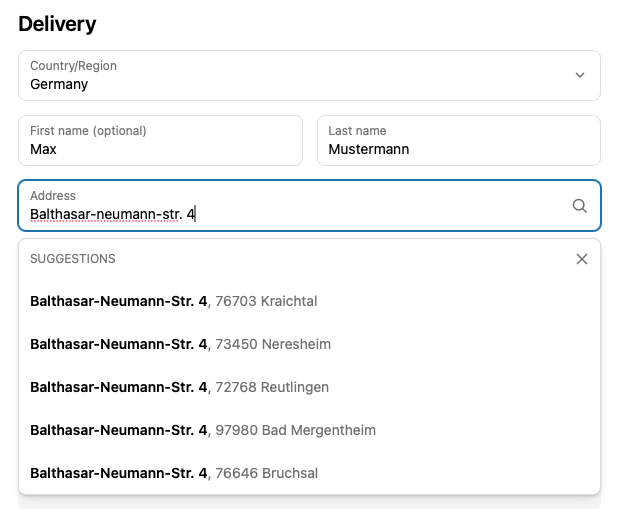
When you start entering an address as a shipping address or billing address, suggestions from endereco should now appear. The „Powered by Google“ message should no longer be visible. Street names should be abbreviated correctly, as officially specified, and conform to the format used by national postal services. Address errors should be flagged and corrected directly if necessary.
All Shopify customers:
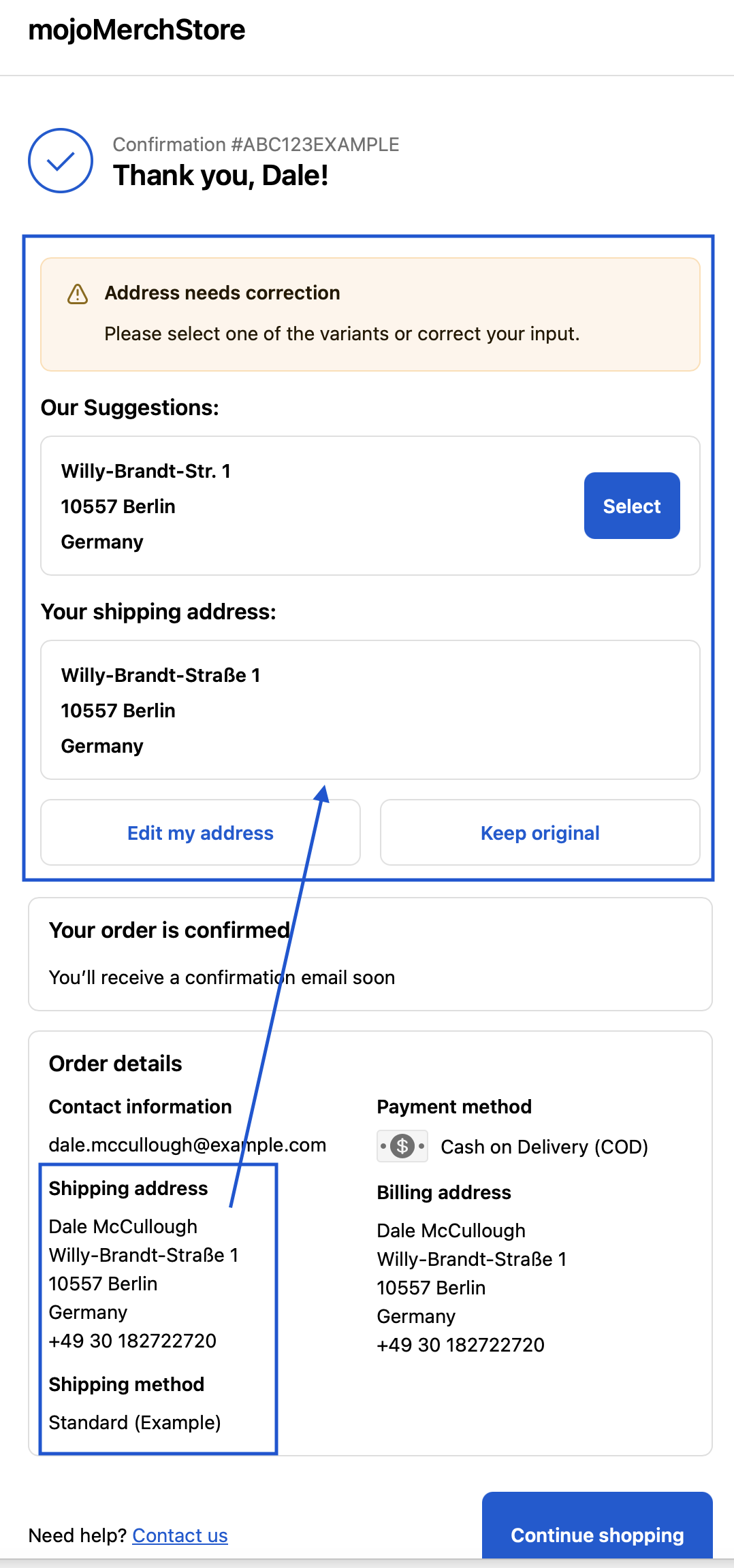
If your customer now places an order, the customer address is checked when the order is completed.
endereco automatically checks and corrects the delivery address entered by the customer.
There are 4 possible scenarios:
- Address correct -> Customer is informed about the successful check
- Address has no errors and has been automatically adjusted -> Customer can check the address and correct it if necessary
- Address with suggestion -> Customer can select and confirm address suggestion
- Address not found -> Customer can edit or confirm his address
- House number not found -> Customer can edit or confirm his address
The system also recognizes Packstations and post offices in Germany and can check them.
At post offices, a valid postal number is also checked.
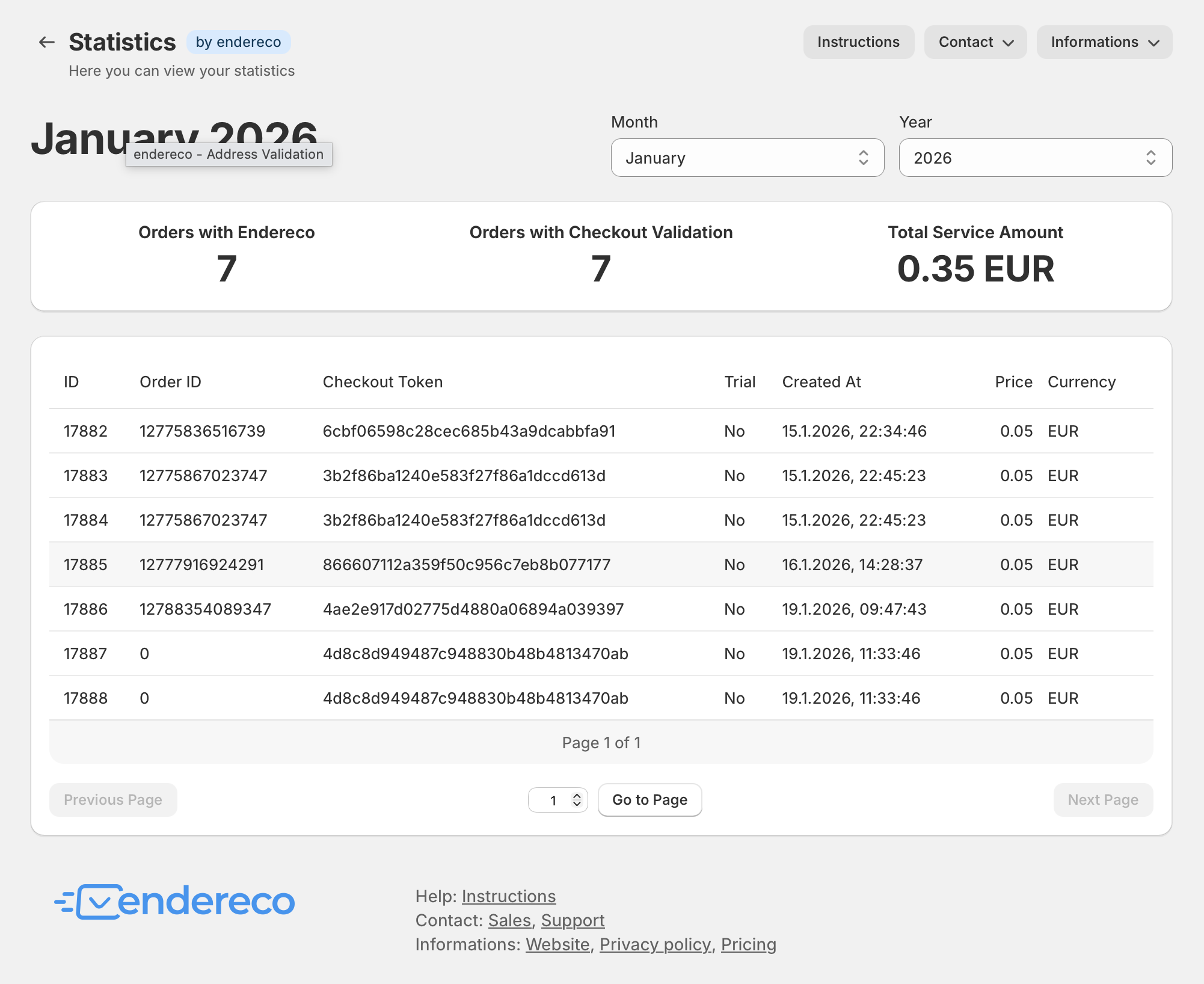
Usage statistics
The ‚Statistics‘ tab in the store backend of the endereco app gives you an overview of the use of our services and the costs incurred in the current billing period at all times.
If you are still in the test phase, the costs should be 0.00 euros.
Any questions? #
We are constantly updating these instructions and adapting them to any changes in the plugin. If you have any questions or ideas for additional functions, please feel free to contact us!
- support@endereco.de for our technical support
- info@endereco.de for our commercial support and sales for new customers
Have fun and success with our endereco for Shopify app!


