


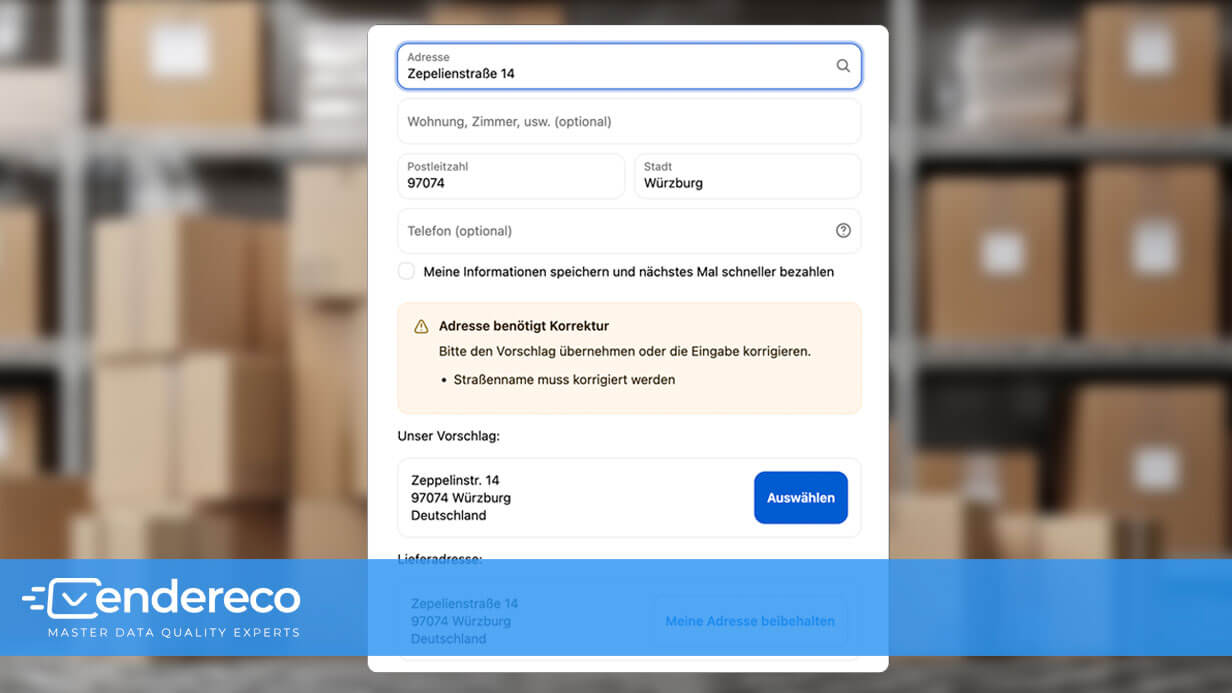
Monday morning—until just a moment ago, the start of the week had been pretty relaxed. But that changes abruptly when I look into the warehouse. Because there’s already a huge pile of returns waiting there. All of them marked with exactly the same note:
„RETURNED … Recipient could not be located at the address provided.“
The problem: Shopify does check whether your customer has filled out all the required fields, but that’s all it does. The checkout process doesn’t care whether the street exists, the house number is correct, or the ZIP code belongs to that location. A fully completed address is by no means a deliverable address.
The tricky part is this: At first glance, the data looks completely correct. The street name appears to be right, the house number is there, and so is the ZIP code. You simply can’t tell from the errors that they have the potential to cause a logistical nightmare.
Because the problems lie in the details:
In one order, the ZIP code and city were switched. In the next one, the house number provided doesn't exist at all. And then there are the classics: typos in the street name or transposed digits in the ZIP code.
The result? Before you know it, the package ends up in a completely different city. A small typo leads to a surprisingly long journey. At first, no one notices … until the packages have been in transit for days and finally end up back in your warehouse by the stack.
And then the time-consuming search begins: open the order, check the address, maybe even comb through your email history. And all because of a minor typo.
This is exactly where automated address verification comes in. It compares customer entries with postal reference data in real time and detects discrepancies even before the label is printed.
Here's how the endereco Address Validation for Shopify. The app checks addresses worldwide for more than 200 countries, detects errors immediately, and suggests the appropriate correction to the customer.
The idea behind it is simple: correct errors right where they occur—not three days later at the package center.
Do you use Shopify Plus? Then skip straight to the section „What Shopify Plus Merchants Get in Addition“, because it's going to get even more interesting for you.
What happens if your customer enters the wrong address?
The address validation runs immediately after the purchase on the thank-you page. Your customer has just placed an order and receives instant feedback on their shipping address.
If the address is correct, everything happens in the background: Your customer sees a brief confirmation, and the process is complete.
But the reality is usually quite different …
As soon as errors occur, the app responds flexibly depending on their severity:
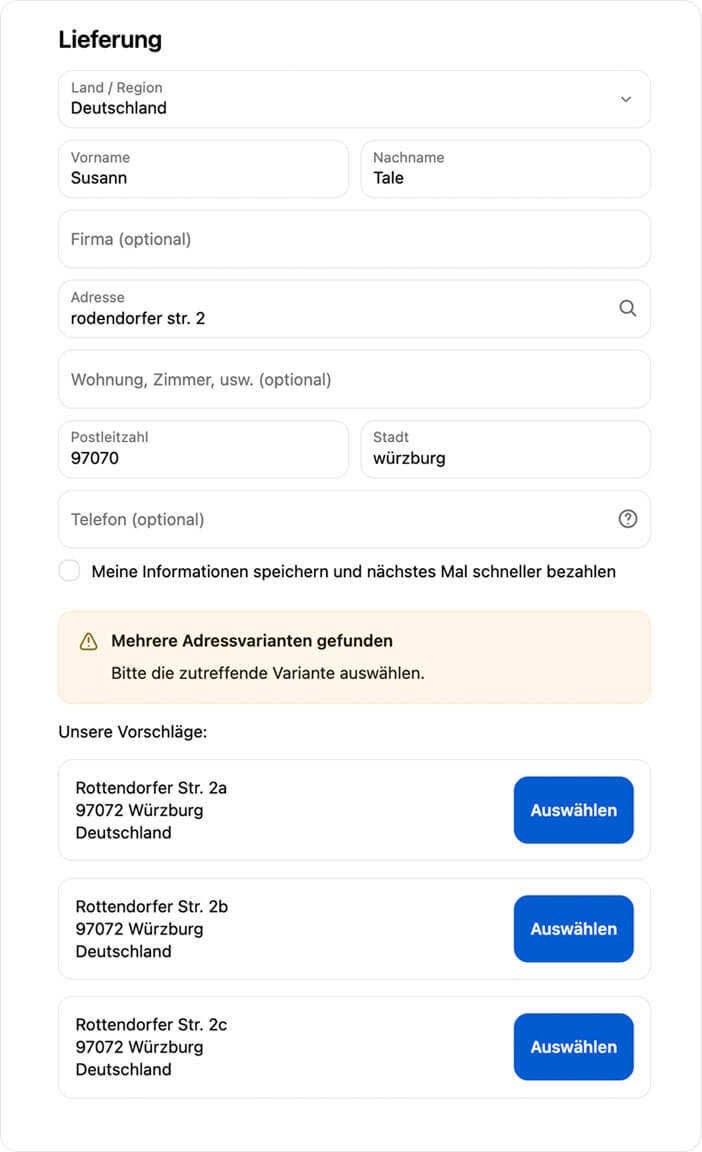
The app automatically corrects minor errors, such as typos in street names or cities, in the background if desired. Your customer is notified of exactly what was changed. For more significant discrepancies, the app actively suggests a suitable address. Your customer can accept this with just one click or adjust the details themselves. If an address cannot be clearly identified—for example, because the house number is completely missing—a notification appears asking the user to verify the information.
The app doesn't force anyone to accept a suggested address. It works more like an attentive assistant who says, „Please take another look here.“
If your customer confirms the address as is despite the note, that is a deliberate decision and not a typo that was accidentally overlooked.
You can see exactly how the endereco address verification works in our Demo Store View.
What Happens in Your Shopify Order Summary
Sometimes a customer ignores the address instructions anyway and completes their order. People do that.
In this case, the app provides a safety net: It can automatically set incorrect orders to „Hold“ status in the backend. This feature can be enabled with a toggle switch.
This prevents incorrect shipping addresses from slipping through the shipping process unnoticed. If the customer corrects their address later and the validation confirms it, the status automatically reverts to „Unfulfilled.“ If the customer intentionally confirms their address as correct, the order is also approved.
Meaningful tags instead of a pile of scraps of paper
In addition, each check adds the appropriate tags directly to the Shopify order. You can see the address history at a glance: Was it checked? Automatically corrected? Intentionally confirmed by the customer? Or flagged as incorrect?
At first glance, this might sound like a minor detail, but in day-to-day e-commerce, it’s worth its weight in gold. After all, if a shipment does end up being returned weeks later, there’s no need to go through the hassle of searching through old emails or notes. A quick look at the order is all it takes to know right away what happened back then.
Packaging Stations and Post Offices in Germany
The app accurately identifies Packstations and post offices. For post offices, it also checks whether a valid DHL postal code has been entered. If this information is missing, the shipping label usually fails to print later, or the package cannot be assigned to the customer. The app catches this before it becomes a problem.
What Shopify Plus merchants get in addition
The validations described so far take effect on the thank-you page after a purchase. If you use Shopify Plus, you can perform the address validation one step earlier: directly during the checkout process.
In practice, that makes a significant difference.
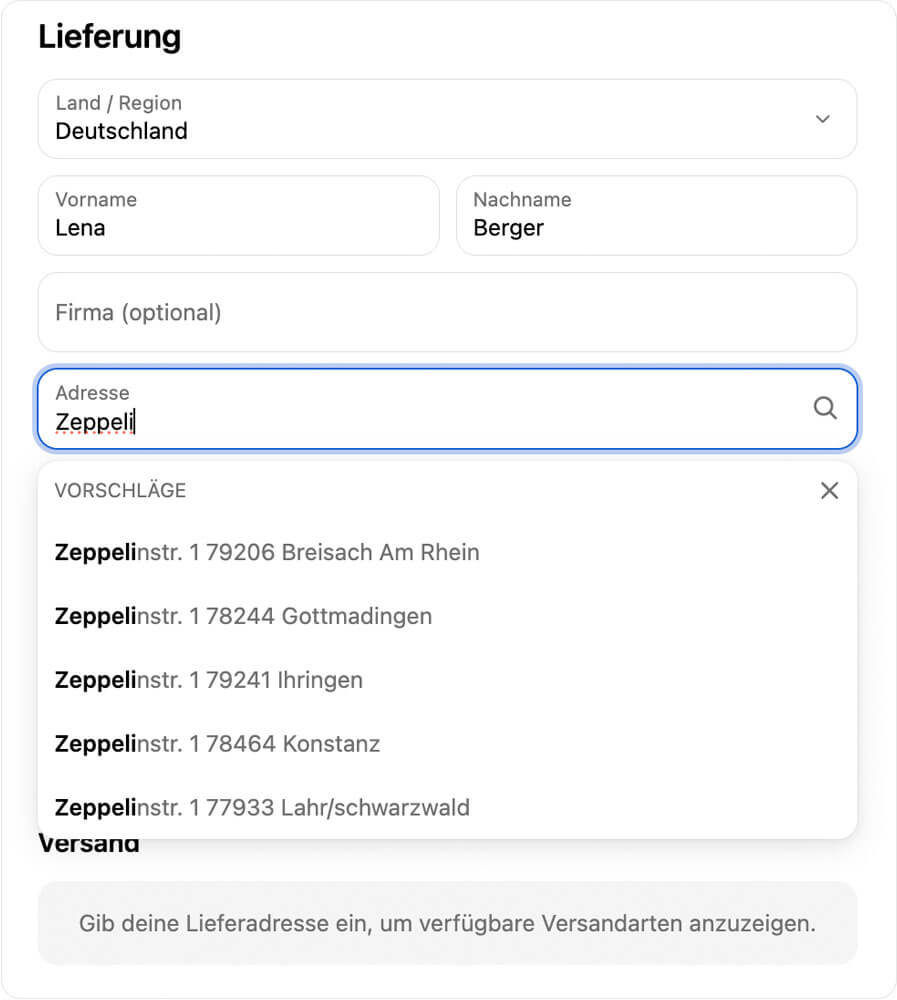
Address suggestions while typing
As soon as your customer starts typing the first few letters, they’ll see relevant address suggestions. These are based on official data from the respective national postal services. From the very beginning, your customer selects an address that is correct for mailing purposes and suitable for shipping.
At the same time, the app also double-checks the addresses saved in the customer’s account. Because let’s be honest: An address saved in a profile isn’t automatically error-free. It’s just saved correctly. This check catches errors right away, even before the „Buy Now“ button is clicked.
Checkout Lock in Case of Errors
As long as an address issue remains unresolved, you can block the checkout. In that case, your customer must correct the address or explicitly confirm the information entered to complete the purchase. This feature can be enabled using a toggle switch if needed.
Before or after the purchase
The real difference between Shopify Plus and the standard plans comes down to timing.
With Shopify Plus, an error is detected even before the order is placed. Without Plus, the check doesn't happen until afterward. If there are any discrepancies, the order is initially placed on „hold.“.
Both approaches protect you from costly returns. With Shopify Plus, the process runs even more smoothly for your team because incorrect orders never make it into your overview in the first place.
Frequently Asked Questions About Address Validation in Shopify
Does the app only check German addresses?
No. The address validation feature supports more than 200 countries. It is based on official address data from national postal services. You can find a complete overview in our Country Overview.
How much does the Shopify app cost?
You can try the app for free for 30 days. After that, you’ll be charged per completed order: 0.04 euros on the Essential plan, 0.06 euros on the Standard plan (Shopify Plus). Billing is handled directly through Shopify. You can find all prices and features on our Pricing Page.
Do I need Shopify Plus for address verification?
No. The verification on the thank-you page works with any Shopify plan. The same applies to automatic holds and order tags. Shopify Plus adds additional features directly to the checkout: live validation, address suggestions as you type, and the optional checkout blocker.
Can my customer reject a suggested correction?
Yes. Your customer always has the final say. They can reject a suggestion and explicitly confirm their original address. The order is then marked accordingly. So the app doesn’t say, „I know better.“ It’s more like, „Are you absolutely sure?“ And most of the time, that little nudge is all it takes.
How long does it take to set up the app?
It usually takes just a few minutes. A setup wizard will guide you through the configuration step by step. You can find all the details in our Shopify Documentation.
Want to know if your customers' shipping addresses are actually valid? Then try the endereco address validation tool for Shopify free for 30 days. Just install it, set it up, and get started. Click here to visit the app in the Shopify App Store.