


endereco Address Management Services Module (AMS)
For OXID 6.x PE, CE & EE
Function description: #
endereco Address Management Services (AMS) improve the quality of your customers’ address data—simply and easily. Incorrect addresses can be corrected directly using intelligent suggestions. Address spellings are automatically standardized. A two-step process in the address forms ensures accurate data entry on virtually any input device.
Level 1
Suggestions for entered address fragments are displayed in an autocomplete function of street, postcode and city. This works on PCs, tablets and smartphones. Address entry is simplified, accelerated and the error rate is massively reduced.
Name Check – Does the Title Match the First Name?
The endereco first-name database, with over 30,000 entries, can identify first names that are unambiguous for a specific gender and highlights the corresponding salutation field in your online store. Ambiguous or unknown names are ignored. Capitalization is automatically corrected.
Email check
An entered e-mail address is checked for various characteristics in real time:
- Valid syntax of the e-mail address
- Valid country domain
- Is the mailbox full or deliverable?
- If it is a one-way address or SPAM e-mail address
Phone numbers normalization
Different ways of writing phone numbers are very common. Endereco cleans up the data and gives phone numbers a uniform, standardized format. In addition, Endereco distinguishes between mobile and landline numbers and can include this information upon request. Invalid area codes are detected and flagged.
Level 2
Address validation
The address check validates the entered fields for validity within the overall context. For entries that are not plausible, valid correction suggestions are automatically offered. The customer can choose between their entry and one of the correction suggestions.
Installation instructions #
Reinstalling the module
The module can be installed via Composer.
Run the following command in the root directory of the store:
composer require endereco/endereco-oxid6-clientThe command downloads the latest version and the namespaces are registered. To install a special version, for example 4.3.2, the command can be customized as follows.
composer require endereco/endereco-oxid6-client:4.5.2Update of the module
To update the endereco client for OXID, simply run the following command:
composer update endereco/endereco-oxid6-clientNotice. When updating from version 3.3.3 to the latest version, the old plugin should first be deactivated and then deleted from the module folder. The latest version of the plugin can then be reinstalled.
Execute migrations!
PS: Feel free to sign up for our Release Newsletter and you will always be informed when an update is available.
Adjustment of the field order
Notice. Starting with version 4.2.0, this manual adjustment is no longer necessary. The field order can be optimized through the module's settings.
To do this, simply adjust the template files
"application/views/MYTHEME/tpl/form/fieldset/user_billing.tpl"
"application/views/MYTHEME /tpl/form/fieldset/user_shipping.tpl"
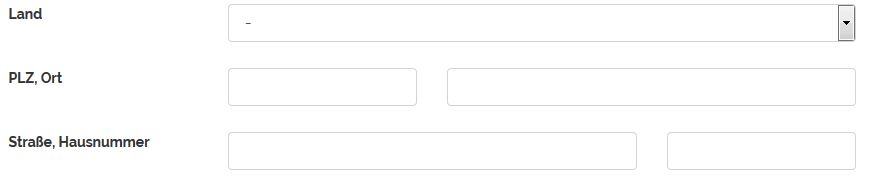
You can specify the order of the input fields by changing the block order in both files. The correct order for the billing address and shipping address is:
Country
Postcode / City
Street / House number
Therefore the following blocks in the code must be swapped:
| Before | After |
|---|---|
| Additional Info "div" Element | Additional Info "div" Element |
| StreetAndNo "div" element | Country + State (Block Element) |
| PostcodeAndCIty "div" element | PostcodeAndCIty "div" element |
| Country + State (Block Element) | StreetAndNo "div" element |
| VatIdNo | VatIdNo |
Example: Swap "street" and "postal code":


After adjusting the field sequence, the address fields should look as follows:
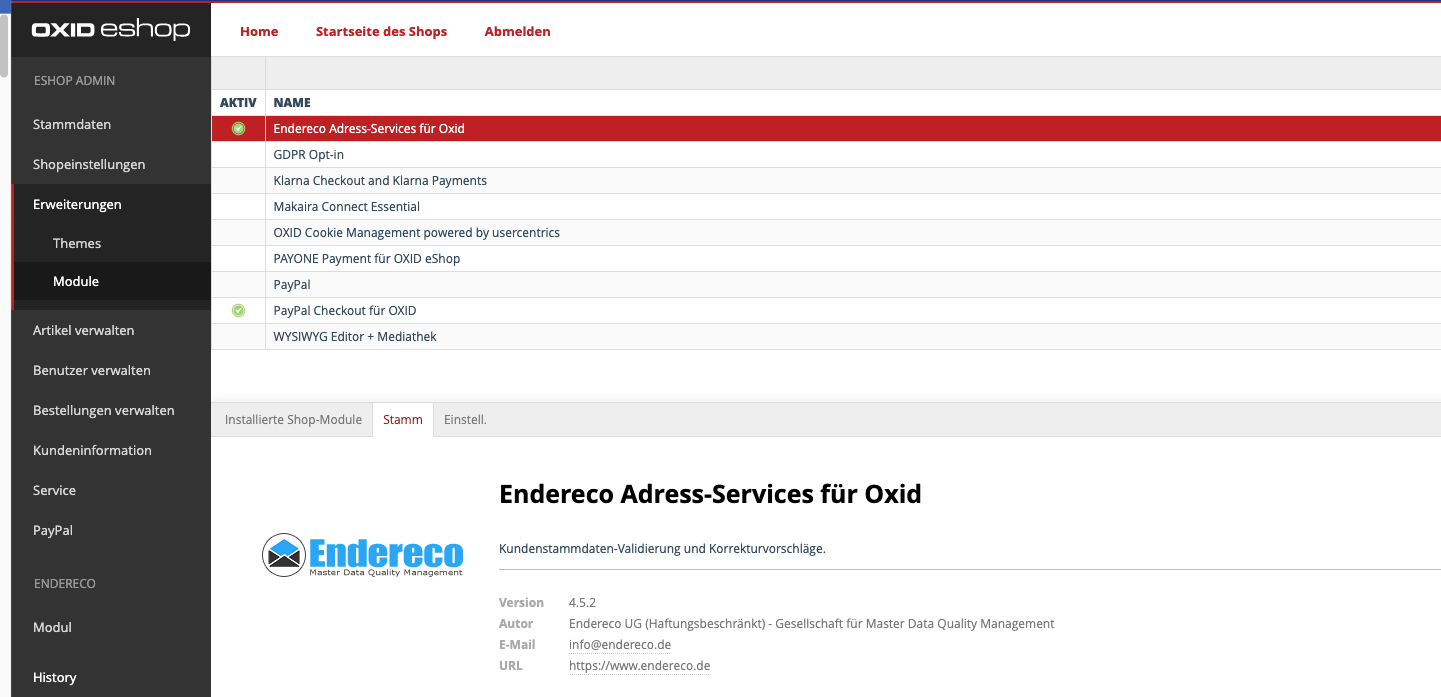
Activate the module in the admin backend
- Log in to the backend
- Extensions → Modules → Click „Endereco Address Services for Oxid“
- Click the „Master“ tab
- Click the „Activate“ button on the right
Request access data #
Access data
The module only works with a valid API key, which you can get from us. If you haven't received one yet, you can get it here or by emailing us directly at info@endereco.de free of charge.
You can try the module 30 days free of charge on your test instance or in the live store from the moment you receive the API key and use all functions.
Limitation:
For licensing reasons, the test is not performed at the house number level during the test period. We will activate this for you in live operation!
You can find more conditions here.
Switch to the paid productive mode
For the live access data, we need your consent to our terms and conditions and the signed data processing agreement. You can do this using our form: Use of endereco services.
Data processing agreement: For some services in which we process the customer's personal data or pass it on to third parties via interfaces in accordance with the GDPR, we require a data processing agreement.
To our general terms and conditions: Our General Terms of Use and AVV | Endereco
We need an approval from the German Post, which can take about 2-3 days.
Entering the access data
- In the shop backend, click on “Extensions/Modules” and select "Endereco Address Services for OXID"
- Select settings
- Enter API key, select service endpoint
- Save entries

Configuration of the module #
Selection of the test mode
You can turn various services on and off:

"Preselect default country" – Here you can set which country is automatically preselected in your address form if OXID hasn't defined a country. Ideally, this should be the country from which you receive the most customer orders.
"Address validation and input wizard" – Based on the data entered, the input wizard generates suggestions for the customer’s ZIP code, the corresponding city, and the street. When selected, the suggested entries are automatically entered into the corresponding address fields.
In the address check, the address is checked again when the form is submitted.
If there is an error, the customer is informed of this via a pop-up window. He now has the option of retaining his entry or accepting a correction suggestion.
"Also check existing customers once" – Your existing customers who have not yet been verified will be automatically verified when they log in. If these customers then proceed through the checkout process, they will be notified of an incorrect address on the „Review and Order“ page if an error occurs and will be redirected accordingly.
"Check PayPal Express Check-out" – The data of customers who wish to complete their order using PayPal Express Checkout is verified.
ATTENTION:
For Amazon Pay customers—Pay with Amazon—the transaction is processed No test of the customer addresses! With „Login with Amazon“, the customer is also not checked.
"Trigger address validation immediately after leaving the address fields". – If this feature is enabled, the address validation is triggered immediately after the user leaves the address fields—for example, by selecting the „First Name“ field.
If this function is not active, the address check is not executed until the form is submitted.
"Continue submitting the form after address selection". – If there is an error in one of the addresses, the address verification pop-up window appears. Once the user has made a selection, they can confirm it by clicking the „Apply“ button.
If this option is enabled, the form submission will continue automatically.
If it is inactive, the user must manually trigger the form submission after closing the pop-up.
"(beta) Automatically fill in fields with only one address suggestion remaining (SmartAutocomplete)". – If only one possible entry is available when entering a part of an address, this suggestion can be automatically entered into the address fields. For example, „Würzb“ → „Würzburg.“.
„E-mail check“ verifies the syntax, accessibility and deliverability of an e-mail box, as well as the existence of an entered e-mail address.
"Salutation check" Checks whether a selected title matches the first name and highlights the title field if the wrong title is selected. If no title has been selected after entering the first name, it can be set automatically, provided that the entered first name has been recognized and can be unambiguously assigned to a gender.
Upper and lower case is also automatically adjusted. Names that are not known or may be ambiguous are not marked as incorrect.
Use standard CSS – Specifies whether the endereco module's default CSS classes should be loaded.
If this option is not enabled, no CSS information will be loaded. You can then define the styling of the elements yourself, for example, in the theme.
Further colour settings - This allows you to adjust the colors for warnings, error texts and notes to the colors of your webshop.
"Trigger address validation when submitting the form". – In this case, the address is not validated until you click „Next“ or „Save.“.
"Output debug information to the browser console". – This feature is especially useful for developers. When enabled, helpful information for debugging the endereco module is displayed in the browser console or developer tools.
This completes the setup.
Choice of styling (.css file) #
The module has been extensively tested with various OXID themes and optimized for them. We support
- Flow (Responsive Theme)
- Wave (Responsive Theme)
- Azure (Standard OXID Theme)
- Roxid (Responsive Theme)
- RoxIVE (Responsive Theme) <- Select this for the FLOW theme as well
- Custom (Individual Theme)
Selecting a specific entry will choose the corresponding style (stylesheet) for each installed template. You can customize this to suit your needs.
Our module usually detects the installed theme and configures itself automatically. You now have the option to customize the colors for various features yourself.
Insert bootstrap into modal?
Should CSS for Bootstrap Modal be included? (Please select this option only if Bootstrap is not being used!)
Generally, you can leave this toggle turned off because most themes are already based on Bootstrap.
This completes the setup. Please empty the temp folder of your webshop before using the module.
Functional test #
Now that you've selected „Germany“ as the country and entered a ZIP code, you should see relevant suggestions for the location—suggestions should also appear as you type in the street name.
We hope you enjoy using our module. We look forward to your feedback, suggestions and feedback. This is the only way we can optimize our services!
If you have any questions we will be happy to help you!
Simply send an e-mail to: support@endereco.de or Tel: 0931 66 39 839 - 0
Your endereco team
Add privacy policy #
Please inform your customers that the address information they enter, as well as any other personal data, will be verified.
You now have 2 options to include this information:
We have prepared a suggested text for you that you can include in your privacy policy. Please customize the suggested text to reflect the services you offer.
On our website, we offer you the option to check certain entries in the address forms of our online store for errors in real time. This is intended to prevent problems with the delivery of the products you have ordered due to incorrect information.
We would also like to ensure that your contact information is current so that we can send you information about your order or contact you if we have any questions.
To provide these functions, we use the service provider Endereco, Balthasar-Neumann-Straße 4b, 97236 Randersacker. The service provider processes the data exclusively in accordance with our instructions. The legal basis for the transfer, processing, and temporary storage of the data by the service provider is Article 6(1)(b) of the GDPR, as it is strictly necessary for the performance of the contract or for the implementation of pre-contractual measures to verify the accuracy of some of the data you enter into the input form. The following data is processed by the service provider:
- Address (country, town, zip code, street, house number if applicable)
- Email address (please delete if not enabled)
- Phone number (please delete if not enabled)The data is processed separately by the service provider and is not combined with other data. The requests are deleted by the service provider as soon as the status of the entered data has been determined and the data has been saved in the online store, but no later than 30 days after submission.
If you are already a customer of IT Law Firm and manage your legal texts there, you can simply add another text section to your other privacy policy content.
In the Legal Text Generator, our endereco services are listed under "Tools and Miscellaneous" > "Use services for automatic address validation and input corrections".


